 TgWitness
Reference / Evidence
Telegram Report Formats & Signed PDF Verification
Report filters, eight designs, contents presets, saved change histories and the assessment included in signed exports.
TgWitness / Documentation · Investigation

Turn selected observations into a readable account of the case: its question, scope, saved changes, charts, findings and source references. Each report gives the recipient a way to check the delivered material and inspect its collection coverage.
The Basis of trust and limitations section appears in journal, handover, chat,
account and sharing reports. Journal and handover PDFs use the same assessment as
their signed report.json. ZIP manifests carry case_assessment in the signed
manifest. This assessment travels with the exported material. The original
observations retain their existing signatures.
Document formats and reading order#
Report studio#
Open Exports → Configure and preview. Work through Data → Design & contents → Preview:
- Use the whole workspace or choose chats, authors, inclusive UTC observation dates and event types. Load the catalog to search chats and authors, or enter their Telegram IDs. Author filters match recorded sender IDs; a deletion notice without a sender does not match an author filter.
- Pick a page design, then choose charts, participant labels, the transcript and your written findings. Changing the design keeps these choices.
- Build the preview. It shows actual counts, activity, participants, sample records, saved changes and missing message-number ranges. Changing a choice marks the preview out of date. Save before downloading HTML, signed PDF, signed JSON or the evidence ZIP.
The data preview counts the complete stable journal prefix, not an initial sample. Only displayed sample rows and long lists are bounded; their omitted counts are shown. A later export takes a fresh stable snapshot, so ongoing collection may increase the figures. Scope, counts and source identity are included in the signed report. Opening or previewing the form does not save it.
Jurisdiction guidance. Under Document details, open Jurisdiction guidance · optional to choose a jurisdiction and civil/commercial or criminal procedure. The appendix carries the legal basis, source links, preparation notes and research status. Local-language summaries and explanations of collection safeguards are optional. No jurisdiction is selected by default. These choices belong to the workspace, and are excluded from saved layout configurations and implicit sharing-copy defaults. See defaults, supported reports and research limits.
Choose the recipient's copy. Charts and the transcript use the selected records. Integrity, custody and coverage describe the full source journal. The evidence ZIP contains its original records and attachments. Use a minimized handover when a recipient should receive only selected, permitted data.
Read edits, deletions and missing IDs#
An edit shows the saved Before and After text and highlights the changed words. A deletion shows the last version saved before the notice. If no earlier content was captured, the report says so. When you select only edits or deletions, the preceding versions remain available as explicitly labelled context outside the filters. Unrelated messages are not added to these histories.
Unobserved message IDs are gaps between known numbers in the chosen chats and date-derived ID span. Every known source record is checked before declaring a number unobserved: filtering out another author, an event type or a date cannot create a false gap. Neighboring saved messages are labelled as context. A missing number does not establish that a message existed or was deleted; deletion notices and unsuccessful rechecks remain separate event types.
Choose a design#
Eight page designs are available for journal and single-chat HTML and signed PDF reports. They use the same records and calculations, with different covers, typography, chapter headings, tables and spacing.
| Design | Reading style |
|---|---|
| Classic | A traditional dossier with a dark cover and numbered sections. |
| Editorial | A framed serif title page, wide margins and a narrow chapter rail. |
| Briefing | A compact cover with a navy spine, short headings and close-set tables. |
| Analytics | A survey-style cover, modular chart plates and monospaced figures. |
| Technical | A ruled register, numbered reference rail and precise comparison tables. |
| Overview | A panoramic cover, generous spacing and prominent summary figures. |
| Reading series | A section rail and grouped chapters for findings, scope, changes and the observation journal. |
| Ledger & margin | Numbered chapters with a wide margin, exact chart tables and a separate message transcript. |
The design is saved per workspace and recorded in the signed export manifest. HTML works offline, supports light and dark themes, and adapts to narrow screens and right-to-left languages. Native PDFs use bundled fonts; the Editorial design includes Noto Serif under its bundled SIL Open Font License. Reading series and Ledger & margin also apply to account overviews, account chats and sharing copies.
Chinese, Japanese and Korean PDFs additionally need a suitable font on the server,
such as Noto Sans CJK, installed system-wide or placed in TGWITNESS_FONT_DIR.
When it is unavailable, the ZIP keeps the HTML and JSON reports.
These two designs include a readable journal without JavaScript. For large exports this view contains up to 500 whole records within an 8 MiB input budget; the report labels the limit and links to the complete viewer and source records. The account directory and relationship index describe that same reading sample, not all participants. Full-journal charts keep their separately stated scope.
Choose the contents#
| Contents preset | Included by default |
|---|---|
| Case dossier | Activity, observation times, participants, chats and the record transcript. |
| Briefing | An activity overview without participant rankings or the transcript. |
| Activity review | Activity, observation times, participants, chats and composition, with source references and exact figures. |
| Custom report | Your own combination of charts, transcript and previews. |
Changing a preset keeps your design, case details and written analysis. Integrity checks, coverage, limitations and verification instructions remain in every design. Source records in the ZIP stay unchanged when a chart or transcript is hidden.
The optional Examination notes contain the question, method, findings and conclusion written by the report's author. Cite the source file and record numbers in the findings. The signature preserves these authored statements alongside the report; source observations and the author's interpretation remain identifiable. Minimized handovers omit these private notes and full-journal charts. Chart and examination choices apply to journal reports.
Select activity over time, the UTC weekday/hour heatmap, participant rankings, chat rankings and record composition. Choose 5–30 ranked groups and neutral participant aliases or account IDs. Unknown senders and the remaining participants are separate rows. Aliases affect charts only; source records still contain their identities.
The design preview updates from the unsaved draft using production cover, examination and chart components, limited to matches within the first 50,000 source records. The data preview below calculates the complete selection. It is explicitly unsigned and does not persist edits. Cover and Charts buttons switch its section. This is not a complete PDF preview. Save report settings applies the choices to future exports; existing signed files are immutable. PDF uses the chosen cover, typography, chapter layout and the same selected aggregates as HTML and signed JSON.
Trust assessment, coverage limitations and verification instructions stay present. Hiding charts or the readable transcript does not remove authoritative source rows from the ZIP. Disabled chart series are omitted from the analytical JSON; use a minimized export to restrict disclosure of source records.
Data-selection filters apply to journal reports; account and sharing exports retain their own acquisition and disclosure scope.
Shared design/chart preferences are frozen into new chat/account exports and account sharing previews. Account/sharing language and privacy settings remain independent; private case and examination notes are not copied into these exports. Account and sharing reports remain HTML protected by their signed archive manifest. Journal, minimized journal handover and single-chat kits also provide signed PDFs.
What the charts count#
Journal activity and heatmaps count new, historical, recovered, edited, deleted and missing-on-recheck observations, by collector observation time in UTC. Heartbeats and attachment receipts are excluded. Participant rankings count only new, historical and recovered message observations: a sender is not declared to be the editor or deleter. Repeated observations can describe the same Telegram message.
Journal analytics retain counts by kind, first/last record references and the source
events.jsonl SHA-256. Figures include exact values in HTML and PDF. Daily buckets
switch to months beyond 366 recorded days; graphs combine these into at most 36
equal-width intervals. More than 100,000 distinct identifiers or 1,200 months marks
the affected chart unavailable, while exact overall counts remain available.
Snapshot and account-sharing charts count only included non-service message rows, using their recorded message time. Sharing aggregates are calculated after redaction and filtering. These charts use at most 90 equal-width UTC date intervals and retain up to 10,000 grouping values; excess counts are explicitly declared and reconciled. The last interval may be shorter. Unknown or naive dates do not enter time charts.
An empty interval means no included observations; consult coverage for gaps. These charts describe saved activity. Unknown senders remain a separate category, and each check is reported individually.
When included, analytics.json is protected by the archive's signed file hashes.
Journal report.json embeds the same selected aggregate. Signature verification
detects changed bytes. To check the figures, recompute journal aggregates with
report_analytics.Analytics and selected, or
snapshot aggregates with snapshot_analytics.collect and project.
Anomaly indicators#
Preview. Evidence reports add an Anomaly indicators section computed by
registered processors (tgwitness/metrics/, one file per metric). The report names every
processor that ran with its version, and prints its method under its table, so the
computation can be repeated from events.jsonl with tgwitness.metrics.run.
| Processor | What it shows |
|---|---|
first_time_posters_over_time v1 |
First-time posters and messages per UTC day. A flag requires at least five first-time posters and three times their median, with message volume at most 1.5 times its median. The baseline uses at least seven observed days within the previous 14 calendar days, after seven days of warm-up. |
service_vs_message_ratio v1 |
Distinct saved message numbers per chat and the share used by service messages. It describes a numbering; it does not explain a particular missing number. |
join_leave_per_month v1 |
Joins, departures and removals or bans per month, one per person, chat, change and day. |
pinned_per_month v1 |
Pin service messages, unpin notices, and pinned messages added or removed between chat-state snapshots, per month. |
Parameters → Report metrics selects processors and the number of displayed rows, including in filtered reports. Daily and monthly tables show recent rows, service-share tables rank chats by saved message count. Totals cover every row.
From a source checkout, build all eight designs listed above from the same fictional journal:
python tools/build_report_styles.py --output test-results/report-stylesOpen the resulting index.html to compare complete HTML reports, signed PDFs and
ZIPs. Every design uses the same source journal. Use a new output directory for
each run so previously signed examples are preserved.
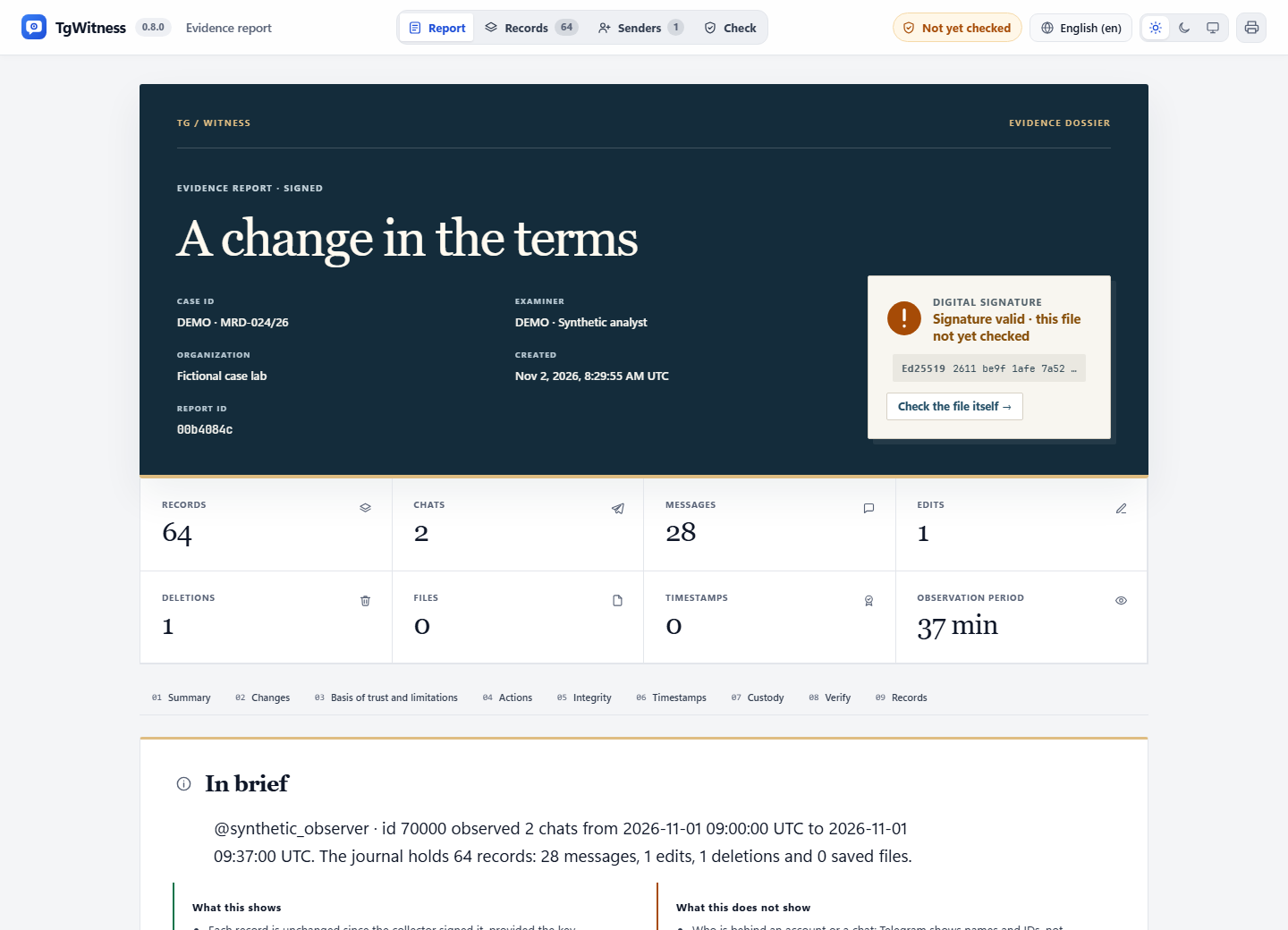
The HTML opens with a case cover and key figures. The numbered evidence map links to each finding, its supporting facts, limits and independent review. Searchable records and stable record references remain available in the offline viewer. The design adapts to narrow screens, both themes and browsers without JavaScript.
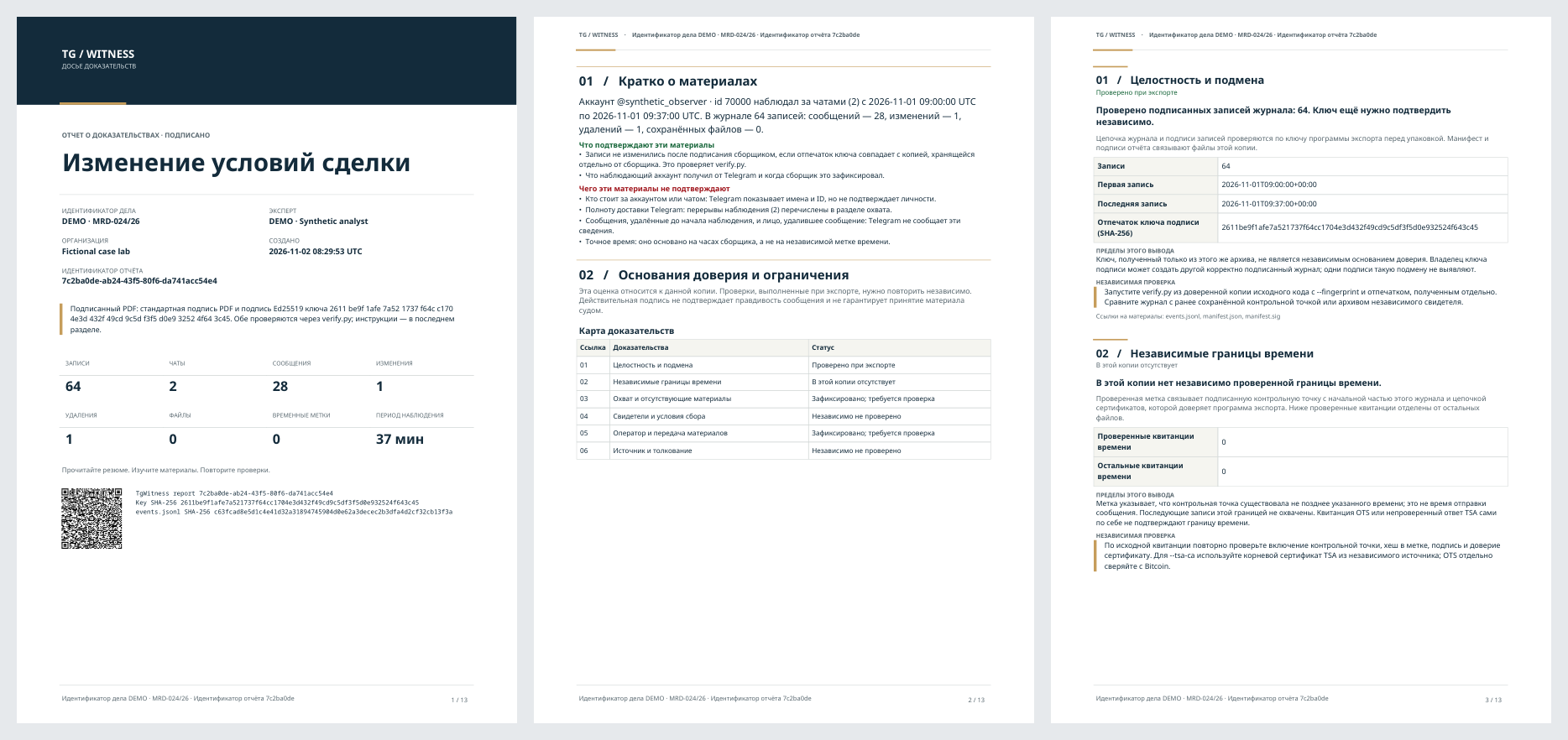
The signed PDF has a dedicated A4 cover, report reference and QR, an executive summary, an evidence map, numbered findings and document bookmarks. Its page headers and footers identify the report. A QR identifies the material; it is not an independent verification result. Browser printouts are separate from this cryptographically signed PDF.
The observation timeline places recorded observation periods and interruptions on the same UTC axis. Empty space is not inferred coverage; the detailed tables retain the exact intervals. The ZIP contains the readable reports, signed JSON, source records and verification instructions.
Generate a fresh, fictional English/Russian/German dossier with the development environment installed:
python tools/build_dossier_example.py --output test-results/my-new-dossierEach language directory contains report.html, report.pdf, report.json and
dossier.zip. Existing sample directories are never overwritten. No Telegram
account, external timestamp service or network connection is used to create it.
Reading a concrete case#
For a journal of 1,200 entries with a validated timestamp at entry 1,000, the report identifies 200 later entries outside that timestamp's bound. This is an upper bound on the existence of a checkpoint, not proof of each message's send time. If three other timestamp files fail validation or cannot be validated, they are counted separately and cannot supply a positive conclusion.
A usable timestamp must satisfy all of these checks: its imprint matches the checkpoint, its signature chains to a trusted TSA root at the stamped time, and the checkpoint's signature, key, count and head match the exact journal prefix. Merely parsing a timestamp or having an OTS receipt is insufficient. The reader must independently choose the trusted TSA root and repeat verification. OTS needs its own Bitcoin confirmation check.
| Report status | Meaning |
|---|---|
| Checked during export | The exporter performed the stated check; independent repetition is still needed. |
| Recorded; review required | The underlying observation or operator statement is recorded; it is not independent confirmation. |
| Not included in this copy | The copy has no supporting artifact for this claim. It does not say none exists elsewhere. |
| Not independently checked | The report does not supply an independent verification result. |
| Incomplete or unavailable | Material or a required check is missing, incomplete or unsuccessful. |
Review each check separately, alongside the recorded collection coverage.
What a strong configuration must preserve#
- Before relying on collection, retain the collector's key fingerprint through a separate trusted channel. Compare that reference with the export's signing key.
- Retain independently timestamped checkpoints and, where used, a witness journal outside the collector's administrative control. Compare them against the exported journal to check its earlier boundaries.
- Record acquisition scope, gaps, filters, limits and changes in collection. Explain missing periods relevant to the actual claim, keeping unobserved message IDs, deletion notices and unsuccessful rechecks distinct.
- Preserve original ZIPs and their hashes. Record each holder, transfer, date and purpose. Retain the attributed operator statements and case notes with them.
- For confidential VMs, preserve and independently verify the quote, challenge, Intel certificate chain, measurements, exact source and key-handling conditions. Keep the attestation verification result with the reviewed artifacts.
See verification scope for the checks of acquisition, archive integrity, time and collection coverage in each mode.
Recipient review#
Use a trusted installation of TgWitness and an independently obtained fingerprint:
python -m tgwitness.verify evidence.zip --fingerprint TRUSTED_SHA256
python -m tgwitness.verify evidence.zip --fingerprint TRUSTED_SHA256 --tsa-ca tsa-root.pem
python -m tgwitness.verify evidence.zip --fingerprint TRUSTED_SHA256 --witness witness.zip --witness-fingerprint WITNESS_SHA256 --require-witness
python -m tgwitness.verify evidence.zip --fingerprint TRUSTED_SHA256 --check-drand
The witness ZIP must come from an independently trusted source; preserve its key and provenance too. Retain the commands, tool version, outputs, reviewed input hashes and unresolved questions. Beacon verification is a separate online check; the report renderer never contacts a service merely to display a report.
For a dispute over a particular message, cite the archive reference, authoritative file and record reference, then describe the relevant time bound, coverage gaps, selection and corroborating material. For a sharing copy, also review the recorded transformation and its references to the source archive. Private filters and identity mappings stay outside its public assessment.
Verification of the signed PDF detects changes to covered bytes. Keep the original digital file and verification result alongside any screenshots or printed reading copies.